

Last Updated: January 2026
This Wealthy Affiliate AI Tools Review 2026 is based on my real experience building niche websites inside the platform — not theory and not marketing copy.
I’ve been a Wealthy Affiliate member since 2015, and I still use it today to build and maintain travel-focused websites that support my location-independent lifestyle. If you’d like more background on my journey, you can read my About page.
Over the years, I’ve watched Wealthy Affiliate shift from being mainly a beginner training platform into something much more practical. In 2026, it functions as an AI-powered business hub — combining writing tools, keyword research, hosting, branding tools, and step-by-step training in one place.
If you’re exploring blogging, affiliate marketing, or building online income while working remotely, this review will help you decide whether Wealthy Affiliate’s AI tools actually fit your workflow — and your expectations.
This isn’t a setup tutorial. It’s a real look at how the tools perform when you’re actually building sites: where they help, where they don’t, and what still requires effort from you.
Affiliate Disclosure:
This article contains affiliate links. If you join Wealthy Affiliate through my link, I may earn a commission at no extra cost to you. I only recommend tools I personally use, test, and believe provide genuine value.
What Is Wealthy Affiliate in 2026? A Hands-On Look at the AI Business Hub
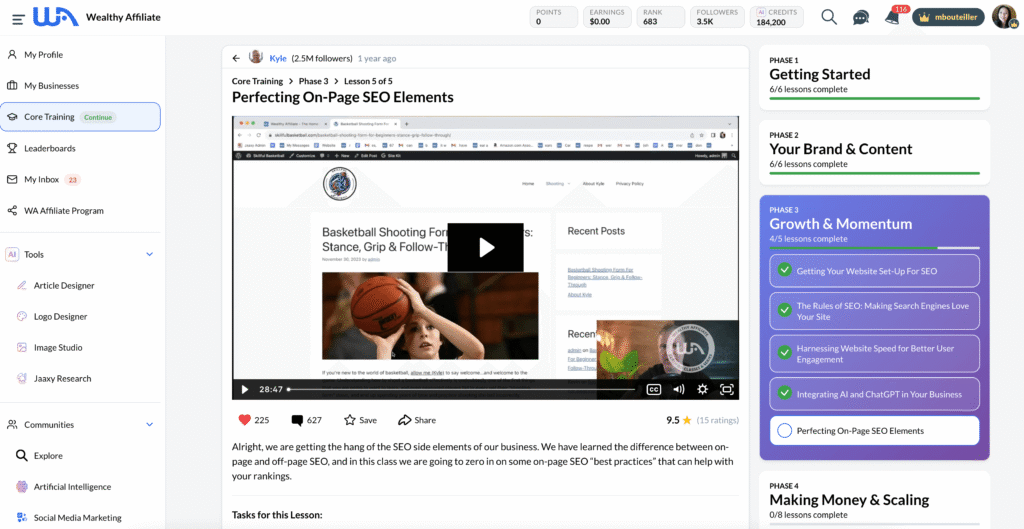
If you’re new to Wealthy Affiliate, here’s the simple explanation.
It started as a beginner-friendly affiliate marketing training platform. Today, it’s an integrated business hub that combines tools and education in one place.
Instead of paying separately for hosting, keyword tools, AI writing software, branding tools, and courses — everything lives inside one dashboard.
Inside Wealthy Affiliate, you’ll find:
- AI Article Designer
- AI Keyword Research (Jaaxy)
- AI Niche Planning
- AI Logo Designer & Image Studio
- WordPress hosting and site builder
- Step-by-step training
- Active community support
The idea is straightforward: remove technical overwhelm and give beginners one structured environment to build a real website from scratch.
Now let me show you what that looks like in practice.
My Honest Experience Using Wealthy Affiliate’s AI Tools
This is where things get real.
Below is what it’s actually been like for me using these tools while building and managing travel-focused niche sites.
Some tools saved me time.
Some required more editing than I expected.
And some only worked well once I understood how to guide them properly.
Here’s how they perform in real-world use.
AI Logo Designer (DesignPop Studio)
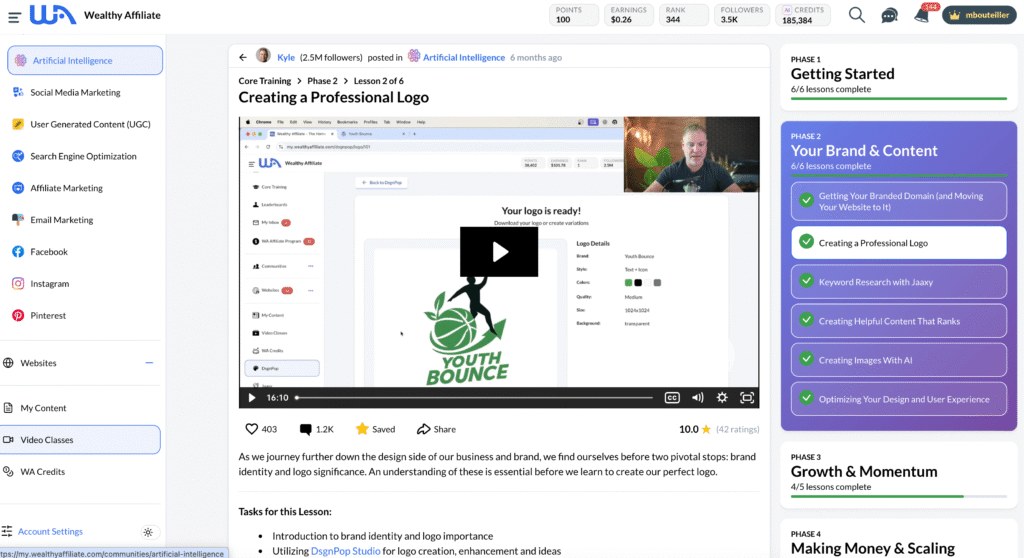
This is the tool I use when branding starts to feel like a roadblock instead of a creative step. If you’ve ever delayed launching a site because you didn’t have a logo yet, this tool removes that friction.
I’ve used the AI Logo Designer to quickly create clean, usable logos for new site ideas and test projects — without overthinking design or waiting until everything feels perfect.
This tool helps you:
- Create a professional logo in minutes
- Establish brand recognition early
- Generate multiple logo styles to test what fits your site
- Avoid paying for design work too early
AI Is a Helper — Not a Branding Shortcut
A logo alone won’t build trust — your content and consistency do that. This tool works best as a starting point, not a final brand decision.
For beginners, it provides something solid to move forward with so branding doesn’t delay publishing.
Once your site has a basic brand identity in place, content creation becomes the next priority — and this is where Wealthy Affiliate’s AI really stands out.
AI Advanced Article Designer (The Star of the Show)
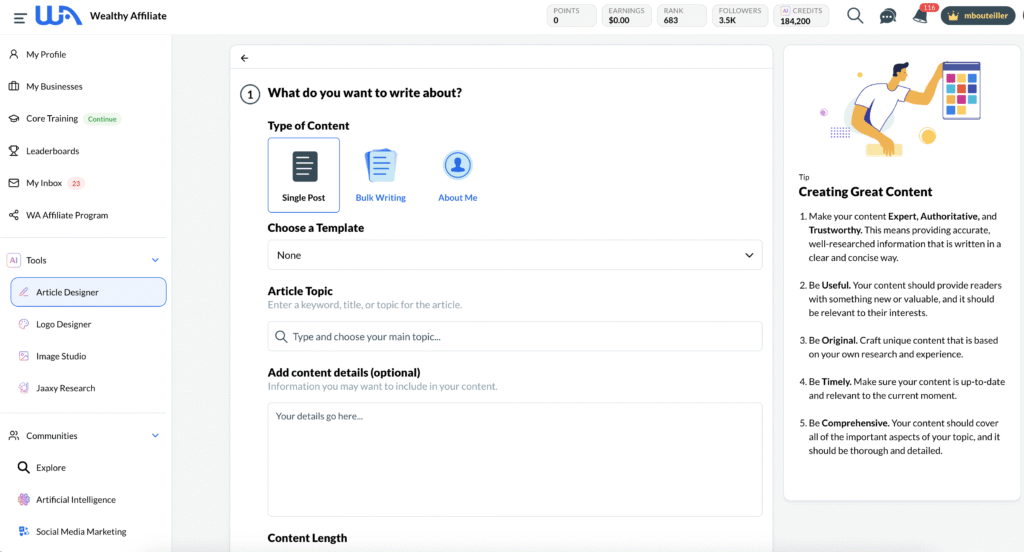
This is the tool I spend the most time in when I’m struggling with writing. It’s helped me turn vague ideas into clear, relevant topics — especially when I’m planning new content for my travel-focused sites.
This tool helps you:
- Generate SEO-focused outlines designed for search visibility
- Create structured first drafts in minutes
- Refine sections for clarity, flow, and readability
- Speed up content creation without sacrificing quality
AI Is a Helper — Not a Replacement
Wealthy Affiliate’s AI tools are designed to assist you — not replace you. Search engines will not rank your articles well if you sound like a robot. The best results come when you guide the AI and then personalize the draft with your own experience, examples, and voice — keeping the content natural, helpful, and human.
If you’ve ever stared at a blank page thinking, “What do I even write?” — this tool removes that stress.
I’ve tested this by publishing AI-assisted content both lightly edited and heavily personalized — and only the articles where I added my own experience, examples, and tone continued to perform well long term.
AI Jaaxy Keyword Research Tool
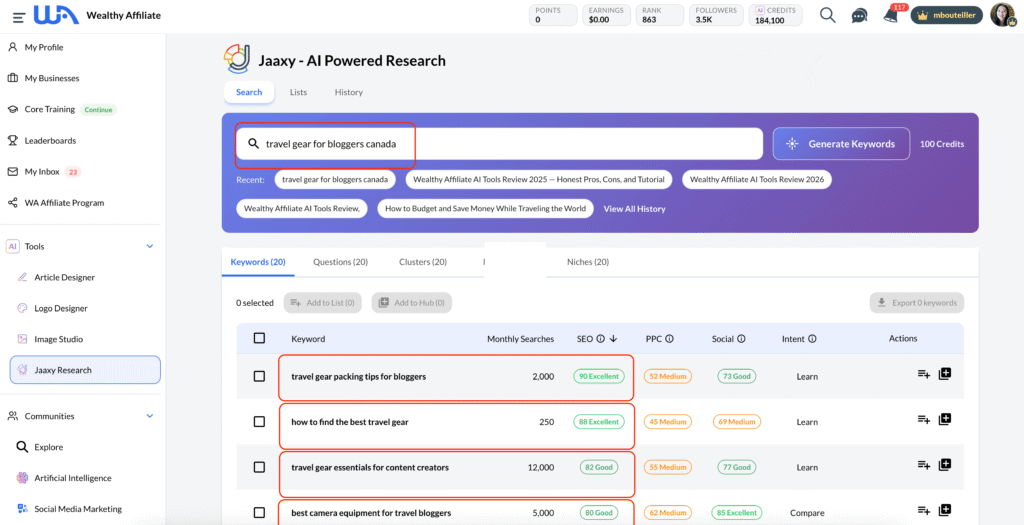
This is one area where Wealthy Affiliate has always been strong. In the image above, I found four high-quality keywords — each representing a different, relevant topic I can realistically rank for.
When I want to make sure I’m not wasting time writing content that won’t rank, I use this specialized SEO tool. It’s helped me focus on realistic keywords, especially when I’m working on newer sites.
In 2026, the AI keyword tool helps you:
- Find low-competition long-tail keywords
- Understand search intent
- Get keyword difficulty scores
- Build keyword clusters
- Spot “easy to rank” opportunities
This is huge for beginners.
Good keywords = faster rankings in search platforms like Google.
After keywords and content are mapped out, visuals become the final layer — helping articles feel complete, readable, and engaging.
AI Image Studio (DesignPop Studio)
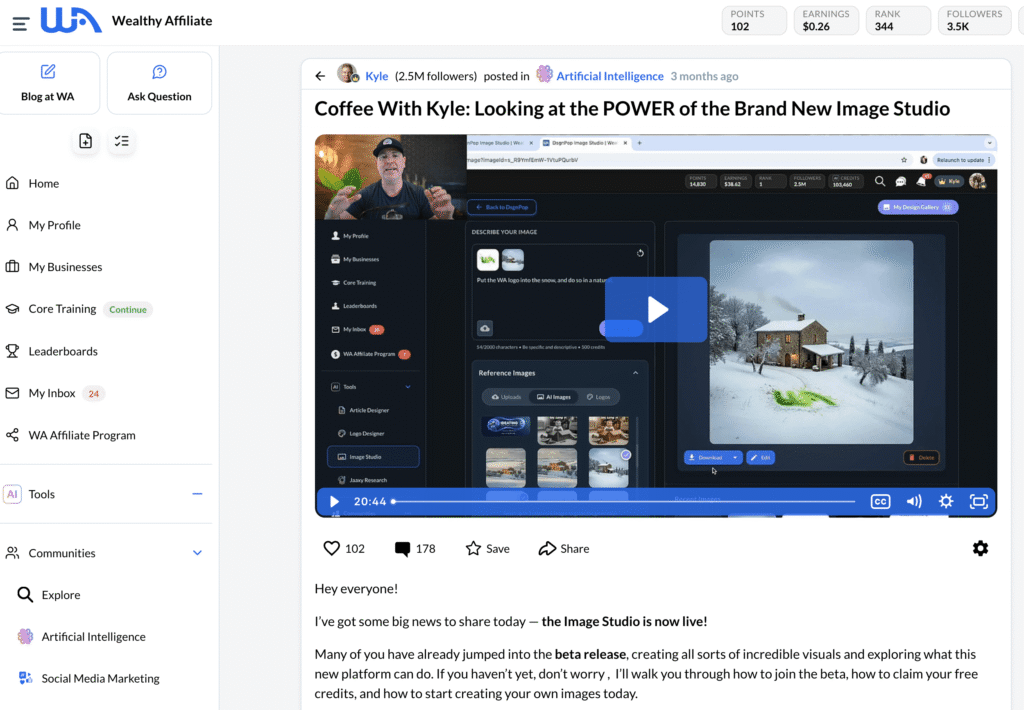
This is the tool I use when I need visuals but don’t want to rely on generic stock photos. It’s especially helpful for featured images, blog headers, and simple brand visuals.
For travel-focused sites, I’ve found it useful for creating images that match a specific topic or mood instead of forcing a stock photo to work.
This tool helps you:
- Create custom images for blog posts, headers, and social media
- Generate visuals that align with your brand style
- Build graphics for promotions and thumbnails
- Edit or transform existing images
AI Is a Helper — Not a Creative Replacement
Image Studio works best when you guide it with clear prompts and intent. The strongest results come when you use AI as a base and apply your own judgment.
If you know what you want visually but can’t create it yourself, this tool bridges that gap without design skills.
Website Builder + Hosting
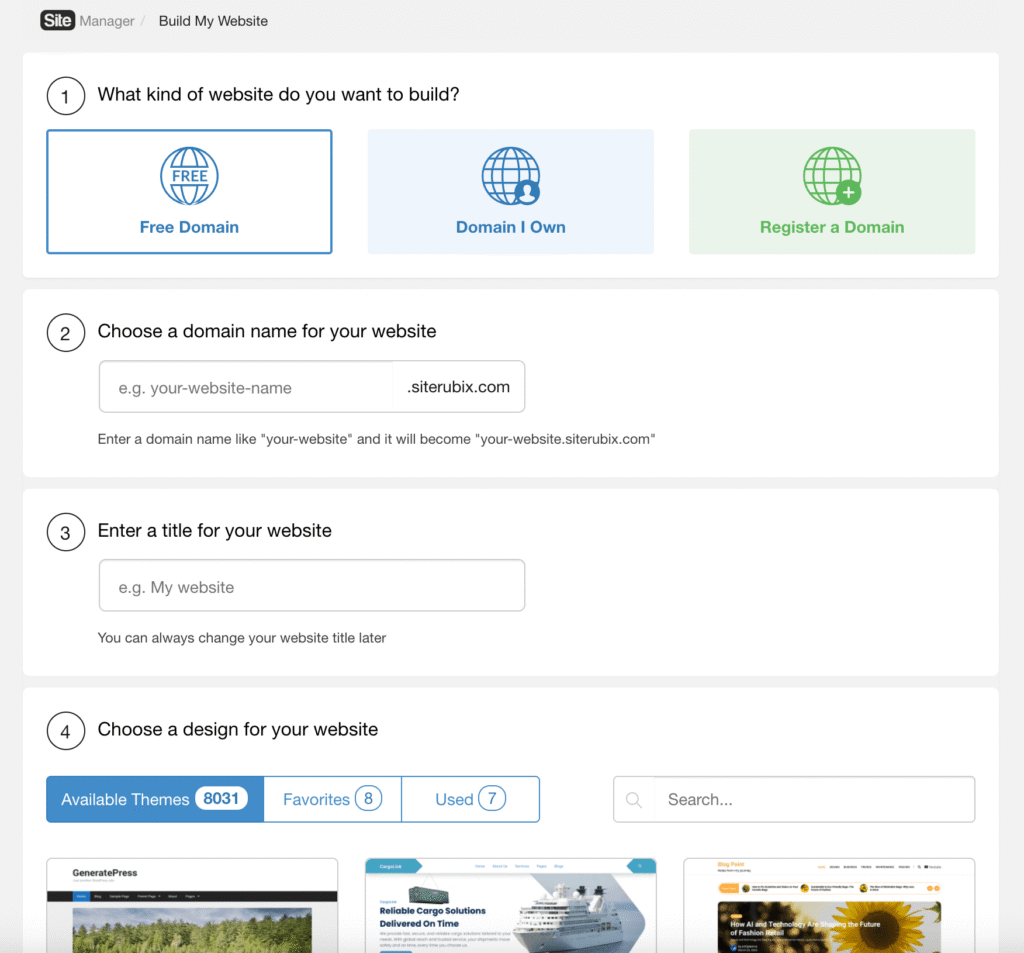
This Website Builder made getting a site online feel much less intimidating for me, especially in the early days. I didn’t have to worry about hosting setup, security, or technical details before I could start creating content.
You can build and host WordPress websites inside Wealthy Affiliate. This Builder comes with:
- Built-in SEO features that handle technical basics like image optimization, SSL security, and site performance — so beginners don’t have to configure everything manually.
- Free SSL(Secure Sockets Layer) for secure internet connections
- Daily backups
- Good site speed
- Malware and security protection
- Site support if something breaks
It’s really nice because you don’t need GoDaddy, HostGator, Bluehost, or any other hosting service.
Community Support
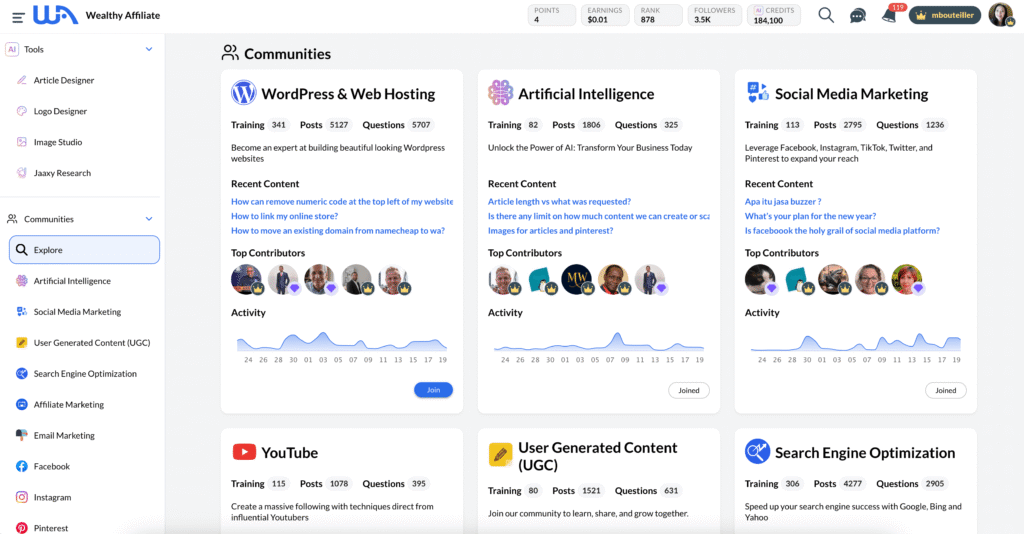
This is one of the biggest reasons I’ve stayed with Wealthy Affiliate over the years. Having real people to ask when you’re stuck makes a huge difference, especially when you’re learning something new.
This is something no AI tool can replace.
You get:
- 24/7 live chat
- Community help
- Experienced mentors
- Step-by-step training
When you’re stuck, it’s nice to have human support.
My Real Workflow Inside Wealthy Affiliate
Let me walk you through what it’s actually like to use Wealthy Affiliate’s AI tools in real life — not just theory.
I’ll break it step by step so you can see what to expect.
How the AI Logo Designer Works
Your logo should be finalized during the initial design stage so that the colours suit your website theme.
The process is straightforward and beginner-friendly:
- Create or select your brand.
Choose an existing project or start a new one inside your dashboard. - Enter your brand name.
This is the identity you want readers to recognize (for example: Travel and Work Anywhere). - Describe your brand.
A short description helps guide the design direction, such as:
“A website dedicated to nomad travelers earning income while traveling.” - Choose your logo type.
- Text only (similar to Google)
- Logo only (similar to Apple)
- Logo + text (most websites use this)
- Select your colours, size, background, and quality level.
- Add optional design instructions.
Useful if you want a more specific look or style. - Generate your logo.
Once generated, your logos can be downloaded, edited, regenerated into different versions, or watermarked. Every version is automatically saved inside your Design Gallery, so nothing gets lost.
Step 1 — Getting Started (It’s Simple)
Once you log in, the AI dashboard is very easy to understand.
You choose:
- A niche
- A topic
- A keyword
- The type of content you want (article, comparison, how-to, list post, etc.)
There’s no steep technical learning curve, which makes it easy to get started quickly.
Step 2 — Using the AI Article Designer

The process looks like this:
- Type in your title or topic
- Choose or create your own template
- Generate an outline
- Review the outline
- Let AI create a draft
- Edit the draft to add your voice
- Publish
To give you a clearer picture, here’s an example of an outline the AI generated for one of my travel-related keywords.
Keyword: travel gear packing tips for bloggers
AI Outline:
- Introduction: Why Smart Packing Matters for Travel Bloggers
- Essential Tech Gear for Content Creation
- Lightweight Clothing Strategies for Multi-Climate Trips
- Organizing Cables, Chargers & Accessories
- Carry-On vs Checked Luggage: What’s More Practical?
- Common Packing Mistakes Bloggers Make
- Final Checklist Before You Leave
This gave me a clean structure to work from. Instead of starting with a blank page, I had a logical framework that I could refine, personalize, and expand with my own experience.
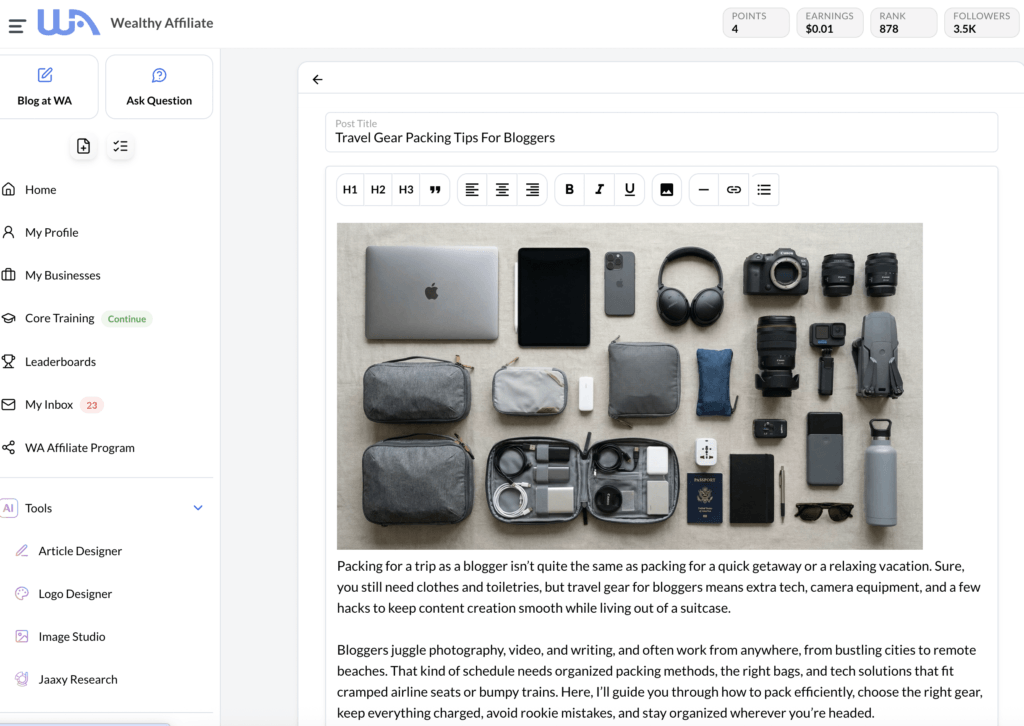
Here’s what I found:
What I liked
- As mentioned earlier, the outlines are clean, structured, and beginner-friendly — which speeds up the entire writing process.
- The tone stays natural when you guide the AI properly, especially after light editing.
- You can guide the voice and structure.
- Overall, it cuts content creation time dramatically compared to writing from scratch. (My writing from scratch would take me 1 – 2 days on average, now it’s around 3 hours including putting my images in.)
What needs human editing
- Some sections can be repetitive.
- AI sometimes overexplains simple ideas.
- You still need to personalize the content — I explain why this matters later in the Cons section.
I find this is normal with all AI tools.
Step 3 — AI Keyword Research Workflow
I hang out here whenever I’m looking for my quality content title.
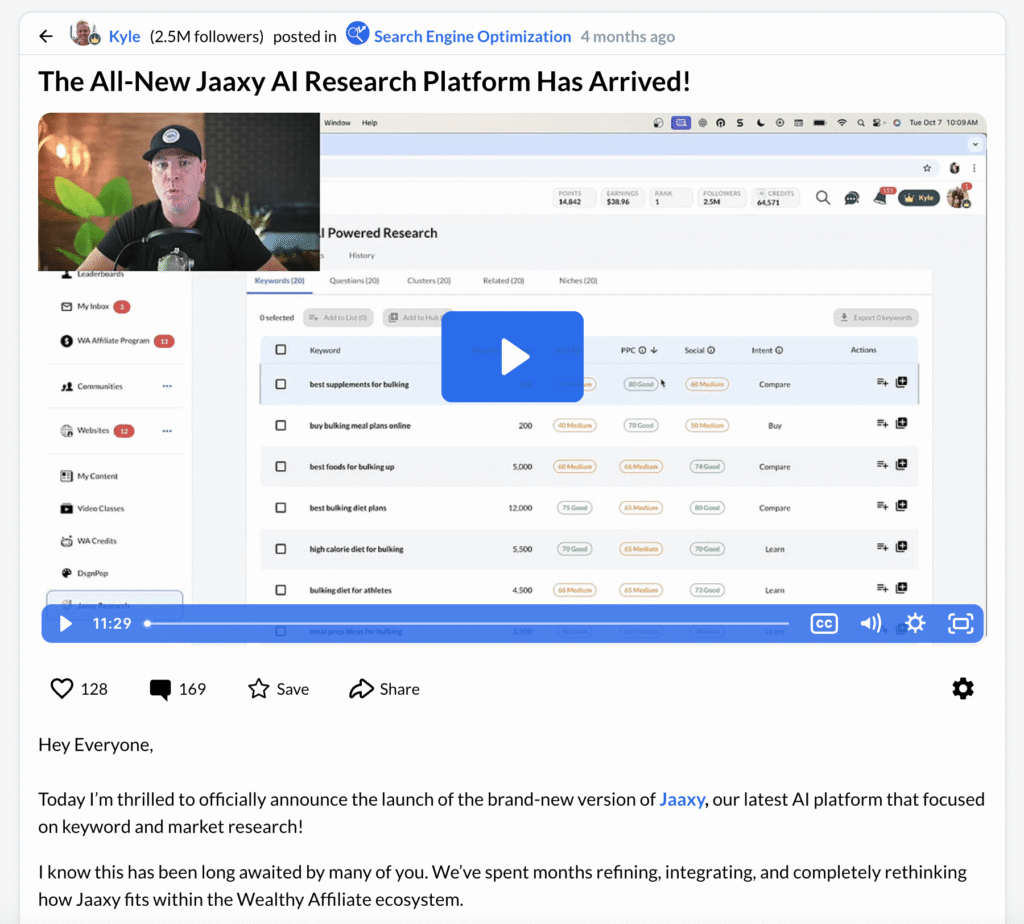
Wealthy Affiliate helps you:
- Find long-tail keywords
- See how hard or easy they are to rank.
- Sort keywords based on competition
- Build a full topic cluster for your site.
For beginners, this is priceless:
You immediately see “which keywords are realistic” for a new website.
For example, while researching inside the Jaaxy AI keyword tool, I found the long-tail keyword “travel gear packing tips for bloggers.” The competition score showed “90 – Excellent,” which indicates a strong opportunity to rank in Google — especially for a newer website targeting a specific niche audience.
Outside keyword tools can cost $49-$99 per month.
Step 4 — Writing, Editing & Publishing Your Article
Once Wealthy Affiliate’s AI Article Designer writes your draft, the real magic happens in your editing.
My editing process comes with thinking of how I can help my readers solve what they’re looking for. It looks like this:
- Shorten long sentences
- Add my own stories or experience
- Add images
- Add examples
- Add internal links
- Add headings
- Fix repeated phrases
- Make the tone sound human and friendly, like you’re having a conversation
The result is a high-quality article that’s optimized for search — while still sounding like you.
Step 5 – Using the Image Studio
You simply describe what you want:
- Enter your image prompt
- Choose your image size
- Select an art or photo style
- Upload your own image, logo, or personal photo (optional)
You can also reference one image while transforming another—useful for keeping visual consistency across your site.
Pros of Wealthy Affiliate’s AI Tools (2026)
After testing these tools extensively, here’s where they genuinely add value — especially for beginners.
Here’s the part everyone wants to know…
What is actually GOOD about Wealthy Affiliate’s AI tools?
Here’s my honest list.
✓ Beginner-Friendly (Huge Win)
- No complicated setup.
- No juggling multiple apps.
- Even non-techy people can learn it fast.
✓ Saves Time on Writing
- Because the outlining and drafting are already handled inside the platform, you can focus more on editing, personalization, and publishing — which is where quality really improves.
- You can produce more content with less stress.
✓ One Platform Does Everything
Instead of individually paying for:
- Hosting
- Keyword tools
- AI writing tools
- Courses
- Support
- Website security
- WordPress setup
- Plugins
You get it all in one place.
✓ Helpful for Research & Ideas
I use the AI Article Designer tool often just to spark ideas when I’m stuck.
It’s wonderful for breaking “writer’s block.”
✓ Support + Real Training
When you hit a wall, you aren’t alone.
- You can ask questions. Wealthy Affiliate has over 2.9 million entrepreneurs from beginners to techies.
- You can read tutorials.
- You can get feedback from experienced entrepreneurs.
That’s something ChatGPT — or any AI tool — can never give you.
✓Current SEO Trends
- The platform continues updating its tools to align with current SEO practices, which helps beginners avoid outdated strategies.
Cons & Limitations (What You Need to Know Before Joining)
No platform is perfect.
Here are the honest downsides.
✗ You Still Need to Edit AI Content
AI can generate a strong starting draft, but it still requires thoughtful editing. If you publish AI content without adding your own experience and insights, it’s unlikely to perform well long term. Google has made it clear that content should be helpful, people-first, and written with real experience in mind (see Google’s Helpful Content guidelines).
Google wants to see:
- Personal experience
- Real examples
- Original insights
- Natural, human writing
All of that still requires you.
✗ Some Users Expect “Quick Money”
Wealthy Affiliate teaches real business skills, not shortcuts.
If you expect to make money in 2 weeks, Wealthy Affiliate will disappoint you.
Success takes:
- Good quality keywords
- Good helpful content
- Consistency
- Patience
AI helps — but you still have to do the real work.
✗Some Users Can Feel Overwhelmed
Because Wealthy Affiliate offers both beginner and advanced training alongside a very active community, new users may feel overwhelmed if they try to do everything at once or move too quickly through the material.
- Information overload: Wealthy Affiliate includes foundational training for beginners as well as more advanced lessons for experienced entrepreneurs. Some beginners feel tempted to skip the basics and jump straight into advanced strategies to speed up the learning process. This can make the platform feel overwhelming rather than helpful.
- Community distractions: The community is a valuable resource, but it can also become a distraction if you spend too much time engaging in discussions instead of working on your own website and content.
Self-discipline is required. Like any all-in-one platform, progress depends on staying focused on your own goals and consistently taking action.
How to avoid overwhelm:
Focus on one training path at a time, apply what you learn before moving on, and treat the community as support — not as a replacement for building your site.
Wealthy Affiliate Pricing (2026): What Do the AI Tools Cost?
Wealthy Affiliate lets you start for free, and you can upgrade later if you want full access to the AI tools, training, and website hosting.
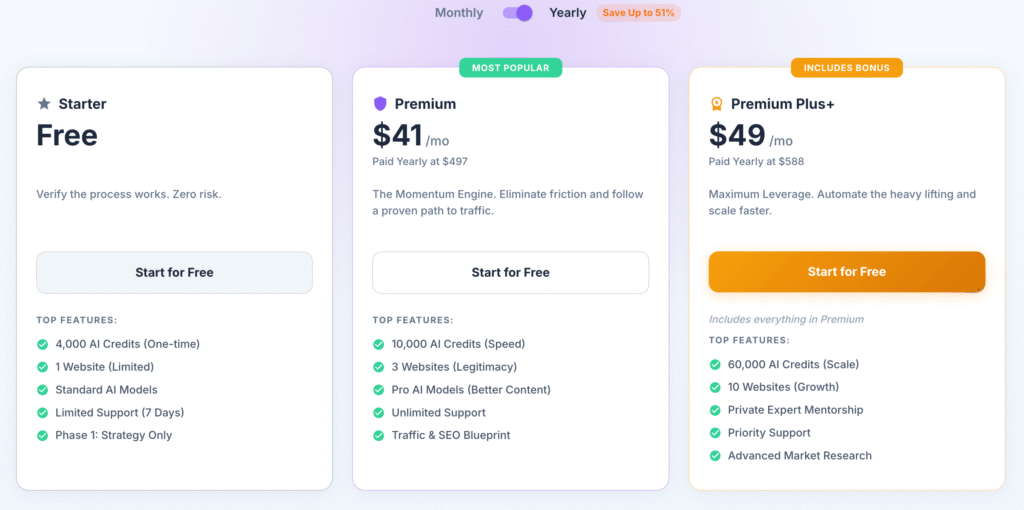
Free Starter Account (Good for testing)
- Access to the platform dashboard
- Limited access to AI features
- Beginner training to help you get oriented
- A chance to explore the workflow before paying
Paid Membership (Best for building long-term)
- Full access to the AI tools (Article Designer, keyword research, niche planning)
- Website hosting and security included
- Full training library
- Community support and mentoring
- Pricing and plan features can change over time, so if you’re comparing options, it’s smart to review the latest details.
If you’re still in the research phase, Wealthy Affiliate lets you explore the platform with a free Starter account — no credit card required.
It’s a low-pressure way to see how the AI tools, training, and workflow actually feel before deciding whether it’s right for you.
Is Wealthy Affiliate AI Tools Worth It in 2026? — My Honest Verdict
Short verdict:
Wealthy Affiliate’s AI tools are worth using in 2026 if you’re a beginner or early-stage blogger who wants structure, guidance, and everything in one place.
I’ve built sites slowly, sometimes imperfectly, inside this platform. It didn’t make things instant. But it did give me structure when I needed it, and momentum when I felt stuck. For beginners especially, that structure can make the difference between quitting and actually building something real.
Why?
Because Wealthy Affiliate gives you:
- A clear path to follow
- A proven system to work with
- A friendly, active community
- A low-cost way to get started
- Step-by-step lessons with videos that build real skills
Everything under one roof — structure, AI tools, hosting, training, and support that reduces overwhelm instead of adding complexity.
Who Is Wealthy Affiliate AI Tools Review 2026 Best For?
- Beginners
- Bloggers
- Side hustlers
- Digital nomads
- Anyone who wants to have an online business promoting their own niche
- People who prefer an all-in-one setup
Who Should Skip Wealthy Affiliate
- People who refuse to write or edit
- Anyone wanting shortcuts
- People who want full control over servers and hosting
For 90% of beginners, WA’s AI tools offer huge value.
Content Cluster Ideas (How This Review Fits My Travel Niche)
This Wealthy Affiliate AI Tools Review 2026 is part of a bigger picture — building online income in a way that supports remote, location-independent work.
On my Travel and Work Anywhere, I focus on practical tools and systems that make that lifestyle realistic. Wealthy Affiliate is one of the platforms I personally use while building travel-focused websites.
If you’re exploring this path, you may also find these related guides helpful:
- My Work-From-Anywhere Setup as a Digital Nomad
- What You Actually Need to Start an Online Business While Traveling
- Best Laptops, Tools & Platforms for Location-Independent Work
- How to Manage Online Work Across Time Zones
- Is Affiliate Marketing Still Realistic While Traveling Full-Time?
These articles support this review by showing how the tools fit into a real, travel-friendly workflow — not just theory.
Google LOVES topic clusters.
They improve rankings and keep readers on your site longer.
Final Thoughts + Call to Action
If you’re a beginner who wants:
- A simple system
- Step-by-step training
- Tools built into one platform
- AI assistance to make writing easier
- An affordable place to start
- A supportive community
Then Wealthy Affiliate is a fantastic choice for 2026.
==> Create your free Starter account and see if the workflow fits your style!
Take your time. Explore. Test the tools.
Wealthy Affiliate AI Tools — Common Questions (2026)
How much does Wealthy Affiliate cost after the free Starter account?
You can begin with a free Starter account. Paid memberships unlock full access to the AI tools, website hosting, keyword research, and the complete training library.
I started as a free member, explored the lessons, and upgraded once I knew I wanted to build long term.
If you’d like to see the latest pricing and what each plan includes, you can view the full breakdown here:
👉 View Wealthy Affiliate’s current pricing and plan features
Tip: The yearly membership for Premium and Premium Plus is more affordable than paying monthly, and you can cancel anytime.
How long does it take to see results as a beginner?
It depends on your effort and consistency, but most beginners take three to six months (sometimes longer) before seeing their first sale.
It took me about four months to see my first results. Wealthy Affiliate’s AI tools helped me publish faster, but progress still depended on choosing good keywords, writing helpful content, and staying consistent.
There are success stories from members who moved faster and others who took longer — but realistic expectations matter. This is a real business, not a shortcut.
Do I own my website and content? Can I move it elsewhere?
Yes — you own the content you create.
If you start with a free SiteRubix subdomain (yoursite.siterubix.com), that domain belongs to Wealthy Affiliate. However, once you purchase your own custom domain, you fully own it.
I began on SiteRubix and later moved to my own domain (travelandworkanywhere.com). The transfer was simple, and migrating to another host in the future is possible if you choose to.
What support do you get if you’re stuck?
Wealthy Affiliate offers 24/7 community and technical support.
You get access to live chat, experienced members, step-by-step training, and platform support if something breaks. For beginners, having real people to ask questions can make a big difference.
One of the reasons I’ve stayed for years is the community — AI tools can help you write, but they can’t replace real guidance when you’re stuck.
How do I know if my niche is profitable?
You can evaluate a niche by checking whether companies already offer affiliate programs in that space.
Search Google for “your niche + affiliate program,” explore affiliate networks like Amazon or ShareASale, and look at commission structures and recurring payouts.
Wealthy Affiliate also includes an AI Niche Finder to help brainstorm ideas. The key is choosing a niche where you can solve real problems and connect readers with useful products or services.
Are there any advanced training in SEO capabilities?
Yes.
After learning the fundamentals, Wealthy Affiliate offers advanced training in SEO, social media marketing, Pinterest, PPC advertising, email marketing, and niche research.
The platform is structured so beginners can start simple and expand into more advanced strategies as their website grows.
If you’re curious whether this workflow fits your style, you can explore Wealthy Affiliate with a free Starter account and decide at your own pace.